<br />
<b>Deprecated</b>:  Creation of dynamic property ps_auto_sitemap::$wp_version is deprecated in <b>/home/xs798704/matomeru-navi.com/public_html/wp-content/plugins/ps-auto-sitemap/ps_auto_sitemap.php</b> on line <b>34</b><br />
<br />
<b>Deprecated</b>:  Return type of St\Plugin\Toc\Symfony\Component\HttpFoundation\ParameterBag::getIterator() should either be compatible with IteratorAggregate::getIterator(): Traversable, or the #[\ReturnTypeWillChange] attribute should be used to temporarily suppress the notice in <b>/home/xs798704/matomeru-navi.com/public_html/wp-content/plugins/st-toc/vendor/symfony/http-foundation/ParameterBag.php</b> on line <b>224</b><br />
<br />
<b>Deprecated</b>:  Return type of St\Plugin\Toc\Symfony\Component\HttpFoundation\ParameterBag::count() should either be compatible with Countable::count(): int, or the #[\ReturnTypeWillChange] attribute should be used to temporarily suppress the notice in <b>/home/xs798704/matomeru-navi.com/public_html/wp-content/plugins/st-toc/vendor/symfony/http-foundation/ParameterBag.php</b> on line <b>234</b><br />
<br />
<b>Deprecated</b>:  Return type of St\Plugin\Toc\Symfony\Component\HttpFoundation\HeaderBag::getIterator() should either be compatible with IteratorAggregate::getIterator(): Traversable, or the #[\ReturnTypeWillChange] attribute should be used to temporarily suppress the notice in <b>/home/xs798704/matomeru-navi.com/public_html/wp-content/plugins/st-toc/vendor/symfony/http-foundation/HeaderBag.php</b> on line <b>273</b><br />
<br />
<b>Deprecated</b>:  Return type of St\Plugin\Toc\Symfony\Component\HttpFoundation\HeaderBag::count() should either be compatible with Countable::count(): int, or the #[\ReturnTypeWillChange] attribute should be used to temporarily suppress the notice in <b>/home/xs798704/matomeru-navi.com/public_html/wp-content/plugins/st-toc/vendor/symfony/http-foundation/HeaderBag.php</b> on line <b>283</b><br />
<br />
<b>Deprecated</b>:  Return type of St\Plugin\Toc\Filter\Rule\Filter_Rule_Collection::count() should either be compatible with Countable::count(): int, or the #[\ReturnTypeWillChange] attribute should be used to temporarily suppress the notice in <b>/home/xs798704/matomeru-navi.com/public_html/wp-content/plugins/st-toc/includes/filter/rule/class-filter-rule-collection.php</b> on line <b>55</b><br />
<br />
<b>Deprecated</b>:  Return type of St\Plugin\Toc\Filter\Rule\Filter_Rule_Collection::getIterator() should either be compatible with IteratorAggregate::getIterator(): Traversable, or the #[\ReturnTypeWillChange] attribute should be used to temporarily suppress the notice in <b>/home/xs798704/matomeru-navi.com/public_html/wp-content/plugins/st-toc/includes/filter/rule/class-filter-rule-collection.php</b> on line <b>46</b><br />
<br />
<b>Deprecated</b>:  Creation of dynamic property St\Plugin\Toc\Plugin_Meta::$name is deprecated in <b>/home/xs798704/matomeru-navi.com/public_html/wp-content/plugins/st-toc/includes/class-plugin-meta.php</b> on line <b>62</b><br />
<?xml version="1.0" encoding="UTF-8"?><rss version="2.0"
	xmlns:content="http://purl.org/rss/1.0/modules/content/"
	xmlns:wfw="http://wellformedweb.org/CommentAPI/"
	xmlns:dc="http://purl.org/dc/elements/1.1/"
	xmlns:atom="http://www.w3.org/2005/Atom"
	xmlns:sy="http://purl.org/rss/1.0/modules/syndication/"
	xmlns:slash="http://purl.org/rss/1.0/modules/slash/"
	>

<channel>
	<title>プライムビデオ アーカイブ - hapimama</title>
	<atom:link href="https://matomeru-navi.com/tag/%e3%83%97%e3%83%a9%e3%82%a4%e3%83%a0%e3%83%93%e3%83%87%e3%82%aa/feed" rel="self" type="application/rss+xml" />
	<link>https://matomeru-navi.com/tag/プライムビデオ</link>
	<description></description>
	<lastBuildDate>Thu, 24 Mar 2022 09:20:12 +0000</lastBuildDate>
	<language>ja</language>
	<sy:updatePeriod>
	hourly	</sy:updatePeriod>
	<sy:updateFrequency>
	1	</sy:updateFrequency>
	<generator>https://wordpress.org/?v=6.9.4</generator>

<image>
	<url>https://matomeru-navi.com/wp-content/uploads/2021/09/cropped-2642330-32x32.jpg</url>
	<title>プライムビデオ アーカイブ - hapimama</title>
	<link>https://matomeru-navi.com/tag/プライムビデオ</link>
	<width>32</width>
	<height>32</height>
</image> 
<site xmlns="com-wordpress:feed-additions:1">197573724</site>	<item>
		<title>Amazon プライムビデオで間違って購入した時の対処法（キャンセルのやり方、できない時は？）</title>
		<link>https://matomeru-navi.com/amazon-mistake</link>
					<comments>https://matomeru-navi.com/amazon-mistake#respond</comments>
		
		<dc:creator><![CDATA[hana]]></dc:creator>
		<pubDate>Sat, 09 Oct 2021 15:00:00 +0000</pubDate>
				<category><![CDATA[amazon]]></category>
		<category><![CDATA[子育てママに役立つ情報]]></category>
		<category><![CDATA[Amazon]]></category>
		<category><![CDATA[プライムビデオ]]></category>
		<guid isPermaLink="false">https://matomeru-navi.com/?p=343</guid>

					<description><![CDATA[<p><img src="https://matomeru-navi.com/wp-content/uploads/2021/10/プライムビデオ-1024x576.png" class="webfeedsFeaturedVisual" /></p>
<p>Amazonプライム会員になっているとAmazonプライムビデオが見られるから嬉しいですよね。 我が家でもFire TV Stickを使ってテレビでみたり、タブレットを使ってAmazonプライムビデオをみたりして楽しんで [&#8230;]</p>
<p>投稿 <a href="https://matomeru-navi.com/amazon-mistake">Amazon プライムビデオで間違って購入した時の対処法（キャンセルのやり方、できない時は？）</a> は <a href="https://matomeru-navi.com">hapimama</a> に最初に表示されました。</p>
]]></description>
										<content:encoded><![CDATA[<p><img src="https://matomeru-navi.com/wp-content/uploads/2021/10/プライムビデオ-1024x576.png" class="webfeedsFeaturedVisual" /></p>
<p>Amazonプライム会員になっているとAmazonプライムビデオが見られるから嬉しいですよね。</p>


<p>我が家でもFire TV Stickを使ってテレビでみたり、タブレットを使ってAmazonプライムビデオをみたりして楽しんでいます。</p>


<p>ですがAmazonプライムビデオは無料の他にも有料で見るものもあります。</p>


<p class="is-style-st-paragraph-kaiwa-b">子供にプライムビデオを見せていたら間違ってAmazonプライムビデオで有料の動画を購入してしまったなんてことはないですか？</p>


<p>実は我が家でも<span class="swl-marker mark_orange">先日、子供が間違って購入してしまいました</span>。過去にも1度あったのですが、その時はあきらめて支払いをしました。</p>


<p>ですが<span class="swl-marker mark_orange">今回は諦めきれずに問い合わせをしてキャンセルをしてもらいました</span>。</p>


<p>なので今回は間違って購入してしまった時の対処法について紹介したいと思います。</p>


<div class="swell-block-capbox cap_box is-style-default" data-colset="col1"><div class="cap_box_ttl"><span>この記事で分かること</span></div><div class="cap_box_content">
<p>・Amazonプライムビデオで間違って有料の動画を購入してしまった時のキャンセル方法 </p>


<p>・キャンセルできない時の問い合わせ方法 </p>


<p>・間違って購入しないための設定方法</p>
</div></div>


<p>まずは間違って購入してしまった流れを説明します。</p>


<p>我が家には1歳になる子がいます。</p>


<p>その子はFire TV Stickのリモコンが好きみたいで常に狙っているんです。</p>


<p>なので普段から触らせないように気をつけていたのですが、届かなかったはずの場所にいつの間にか手が届くようになっていて、気がついたらリモコンを持っていました。</p>


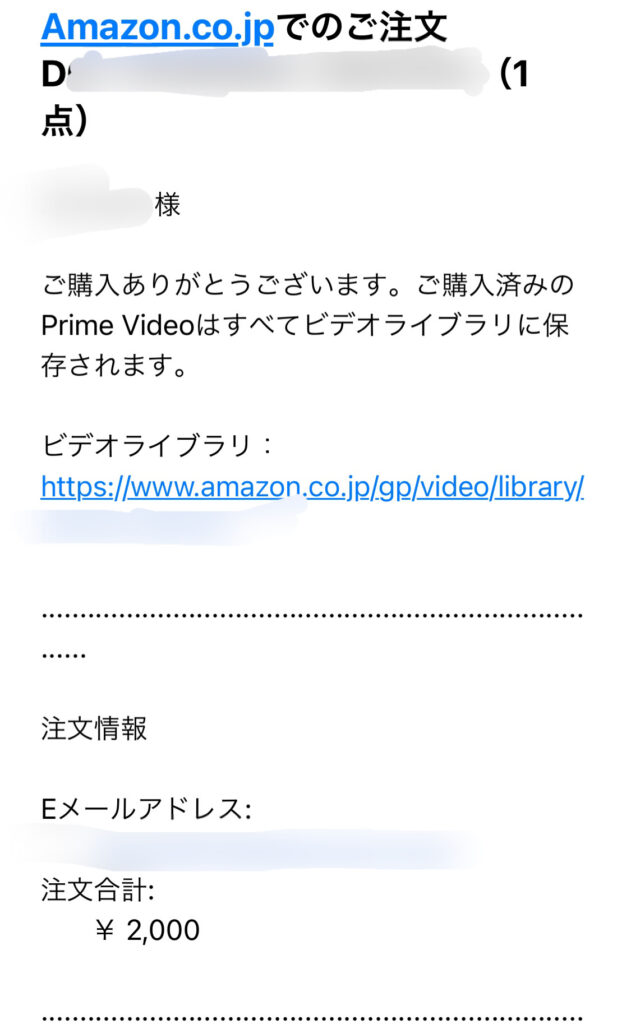
<p>その時は慌てて取って終わったのですが、夜メールをチェックしていると</p>


<p>下の画像のメールが来ていました。全く身に覚えのないメールにびっくり！</p>


<p>正直、迷惑メールかと思いました。</p>


<div class="wp-block-image"><figure class="aligncenter size-large is-resized"><img decoding="async" src="https://matomeru-navi.com/wp-content/uploads/2021/10/5252C72B-7AA3-486C-A3B5-47E66372FC98-631x1024.jpeg" alt="" class="wp-image-349" width="279" height="450"/></figure></div>


<p>ですが、後々よく考えてみると夕方に子供が触ったからかもと思い当たりました。</p>


<p>慌ててプライムビデオをチェックしたら、1980年代の古い映画が購入されていました。</p>


<p>過去には次男がシンゴジラを購入したのですが、その時は見ればいいかと諦めたんです。でも今回は諦めきれませんでした。</p>


<h2 class="has-text-align-center is-style-st-heading-custom-naked has-pale-pink-color has-light-grayish-red-background-color has-text-color has-background has-st-regular-font-size wp-block-heading">Amazonプライムビデオで間違って有料動画を購入してしまった時のキャンセル方法</h2>


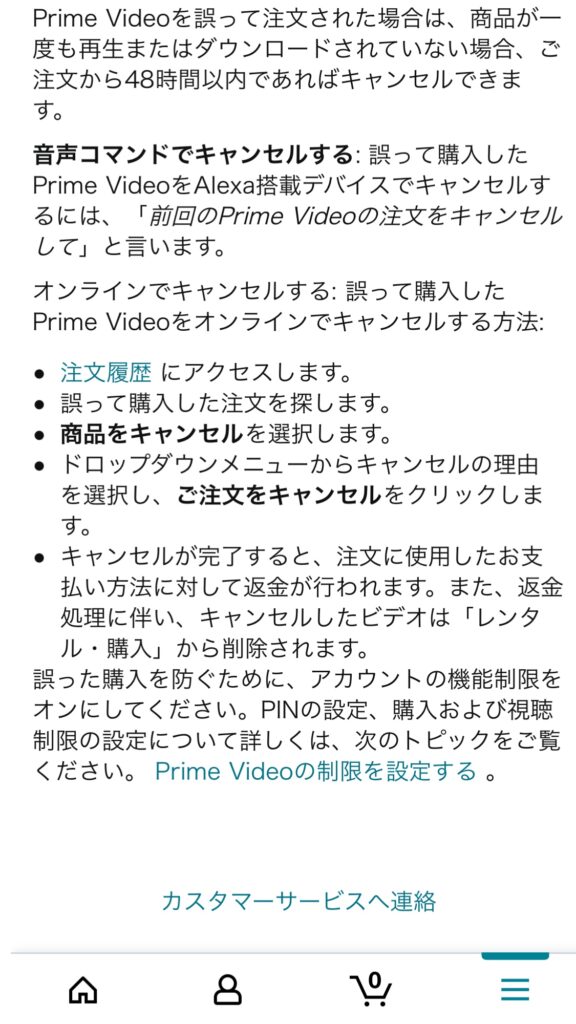
<p>間違って購入してしまった時、キャンセルするには条件があります。</p>


<h3 class="has-pale-pink-color has-light-grayish-red-background-color has-text-color has-background wp-block-heading">キャンセルできる条件</h3>


<div class="swell-block-capbox cap_box is-style-intext" data-colset="col2"><div class="cap_box_ttl"><span></span></div><div class="cap_box_content">
<p><strong>・ダウンロードやストリーミング再生を行なっていないこと</strong></p>


<p><strong>・購入して48時間以内であること</strong></p>
</div></div>


<p>以上の2点がキャンセルできる条件になります。</p>


<h3 class="is-style-st-heading-custom-bubble has-pale-pink-color has-light-grayish-red-background-color has-text-color has-background wp-block-heading">キャンセルのやり方</h3>


<p><strong>1.注文履歴を表示します</strong></p>


<p><strong>2.次に誤って購入した注文を探します</strong></p>


<p><strong>3.ご注文をキャンセルを選択します</strong></p>


<p><strong>4.キャンセル理由を選択して注文のキャンセルをクリックすれば完了です</strong></p>


<h2 class="has-text-align-center is-style-st-heading-custom-naked has-pale-pink-color has-light-grayish-red-background-color has-text-color has-background wp-block-heading">キャンセルできない時は問い合わせてみる</h2>


<p>キャンセルができない時には問い合わせてみるともしかしたら、キャンセルしてもらえることもあるかもしれません。</p>


<h3 class="wp-block-heading">実際に問い合わせてみた</h3>


<p>実は我が家では購入して48時間以内ではあったのですが、ストリーミング再生されたのかがわかりませんでした。</p>


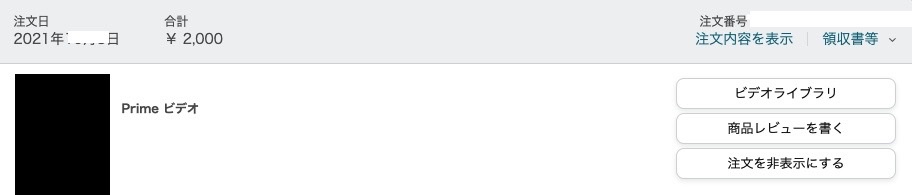
<p>&nbsp;注文履歴で見たら下のような画面でした。</p>


<figure class="wp-block-image size-full"><img decoding="async" width="912" height="195" src="https://matomeru-navi.com/wp-content/uploads/2021/10/A3ED7ACB-340D-4592-A6A4-F1DE35B47E8D_4_5005_c.jpeg" alt="" class="wp-image-345" srcset="https://matomeru-navi.com/wp-content/uploads/2021/10/A3ED7ACB-340D-4592-A6A4-F1DE35B47E8D_4_5005_c.jpeg 912w, https://matomeru-navi.com/wp-content/uploads/2021/10/A3ED7ACB-340D-4592-A6A4-F1DE35B47E8D_4_5005_c-300x64.jpeg 300w, https://matomeru-navi.com/wp-content/uploads/2021/10/A3ED7ACB-340D-4592-A6A4-F1DE35B47E8D_4_5005_c-768x164.jpeg 768w" sizes="(max-width: 912px) 100vw, 912px" /></figure>


<p>本来ならビデオライブラリの上にご<strong>注文をキャンセルを選択</strong>のボタンがあるのだと思います。</p>


<p>ですがキャンセルの表示が出てこなかったんです。</p>


<p>なのでもしかしたら、再生されてしまったのかもしれません。</p>


<p>ただ、動画の時間と残りの再生時間が一緒なので、諦めきれずに<a href="https://amzn.to/3DkrLKG" target="_blank" rel="noopener">Amazonカスタマーサービス</a>に問い合わせをしてみることにしました。</p>


<p>&nbsp;</p>


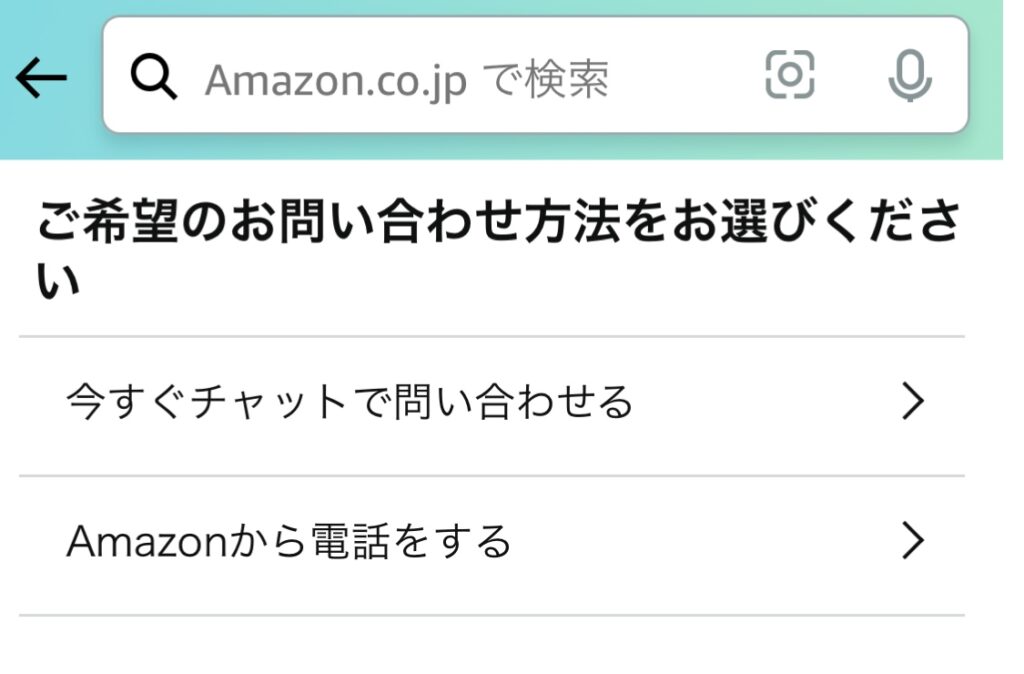
<p>カスタマーサービスでは、チャットと電話が選べたので、わたしはチャットでお願いしました。</p>


<p>&nbsp;</p>


<p>赤ちゃんが間違ってFire TV Stickのリモコンを触ってしまい、間違って映画を購入した旨を伝えました。</p>


<p>すると機能制限をしていましたか？との返答が来ました。</p>


<p>していません。と正直に答え機能制限のやり方を教えてもらいました。</p>


<p>そして、今回は事情が事情なので特別に返金しますとのお返事が来ました。</p>


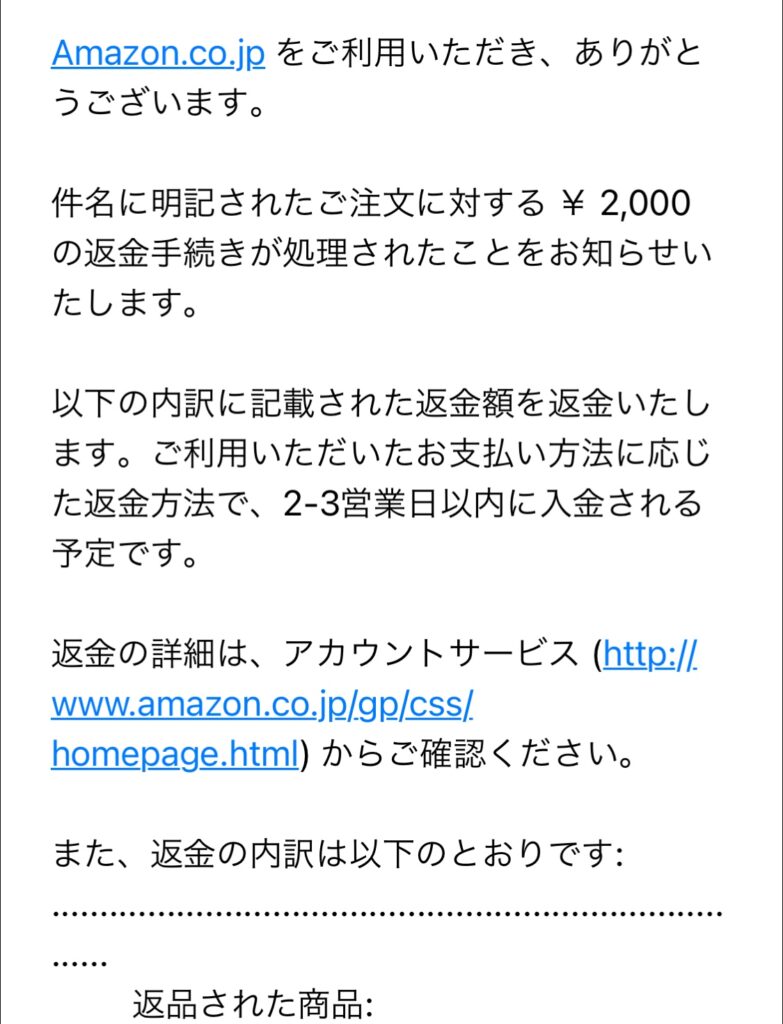
<p>お礼を伝えチャットを終了すると返金のメールが来ました。</p>


<div class="wp-block-spacer" style="height: 34px;" aria-hidden="true"> </div>


<div class="wp-block-image"><figure class="aligncenter size-large is-resized"><img decoding="async" src="https://matomeru-navi.com/wp-content/uploads/2021/10/D93E385E-93A1-4804-9947-163DEEE83EA8-783x1024.jpeg" alt="" class="wp-image-354" width="327" height="426"/></figure></div>


<div class="wp-block-spacer" style="height: 40px;" aria-hidden="true"> </div>


<p class="is-style-st-paragraph-attention-gray">必ず返金してもらえるとは限りませんが、間違って購入してしまった場合、もしかしたら状況によっては返金してもらえるかもしれません。</p>


<div class="wp-block-spacer" style="height: 44px;" aria-hidden="true"> </div>


<h3 class="has-text-align-center is-style-st-heading-custom-bubble has-pale-pink-color has-light-grayish-red-background-color has-text-color has-background wp-block-heading">カスタマーサービスの問い合わせ方法</h3>


<p class="has-text-align-center has-large-font-size"><strong>＜PCの場合＞</strong></p>


<p class="has-text-align-center">まずは画面左うえの全てをクリックします</p>


<div class="wp-block-image"><figure class="aligncenter size-full"><img decoding="async" width="174" height="248" src="https://matomeru-navi.com/wp-content/uploads/2021/10/6523ADA1-61A1-44B3-83F8-479FCCB2063F_4_5005_c.jpeg" alt="" class="wp-image-358"/></figure></div>


<div class="wp-block-spacer" style="height: 49px;" aria-hidden="true"> </div>


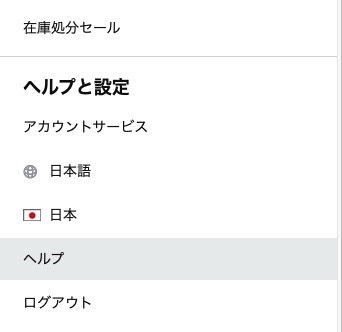
<p class="has-text-align-center">次に下の方にあるヘルプをクリック</p>


<div class="wp-block-image"><figure class="aligncenter size-full is-resized"><img decoding="async" src="https://matomeru-navi.com/wp-content/uploads/2021/10/84E4F300-4F4E-4633-AFA5-E1CD378873D2_4_5005_c.jpeg" alt="" class="wp-image-359" width="313" height="303" srcset="https://matomeru-navi.com/wp-content/uploads/2021/10/84E4F300-4F4E-4633-AFA5-E1CD378873D2_4_5005_c.jpeg 342w, https://matomeru-navi.com/wp-content/uploads/2021/10/84E4F300-4F4E-4633-AFA5-E1CD378873D2_4_5005_c-300x291.jpeg 300w" sizes="(max-width: 313px) 100vw, 313px" /></figure></div>


<div class="wp-block-spacer" style="height: 63px;" aria-hidden="true"> </div>


<p class="has-text-align-center">そしてまた下の方にある<strong>トピックから探す</strong>の<strong>問題が解決しない場合は</strong>を選択すると<strong>カスタマーサービスに連絡</strong>と出てきます。</p>


<div class="wp-block-image"><figure class="aligncenter size-large is-resized"><img decoding="async" src="https://matomeru-navi.com/wp-content/uploads/2021/10/047C843F-E877-4906-A07E-4BE06436BAF1-1024x475.png" alt="" class="wp-image-360" width="765" height="354" srcset="https://matomeru-navi.com/wp-content/uploads/2021/10/047C843F-E877-4906-A07E-4BE06436BAF1-1024x475.png 1024w, https://matomeru-navi.com/wp-content/uploads/2021/10/047C843F-E877-4906-A07E-4BE06436BAF1-300x139.png 300w, https://matomeru-navi.com/wp-content/uploads/2021/10/047C843F-E877-4906-A07E-4BE06436BAF1-768x356.png 768w, https://matomeru-navi.com/wp-content/uploads/2021/10/047C843F-E877-4906-A07E-4BE06436BAF1.png 1057w" sizes="(max-width: 765px) 100vw, 765px" /></figure></div>


<div class="wp-block-spacer" style="height: 75px;" aria-hidden="true"> </div>


<p class="has-text-align-center has-large-font-size"><strong>＜スマホアプリの場合＞</strong></p>


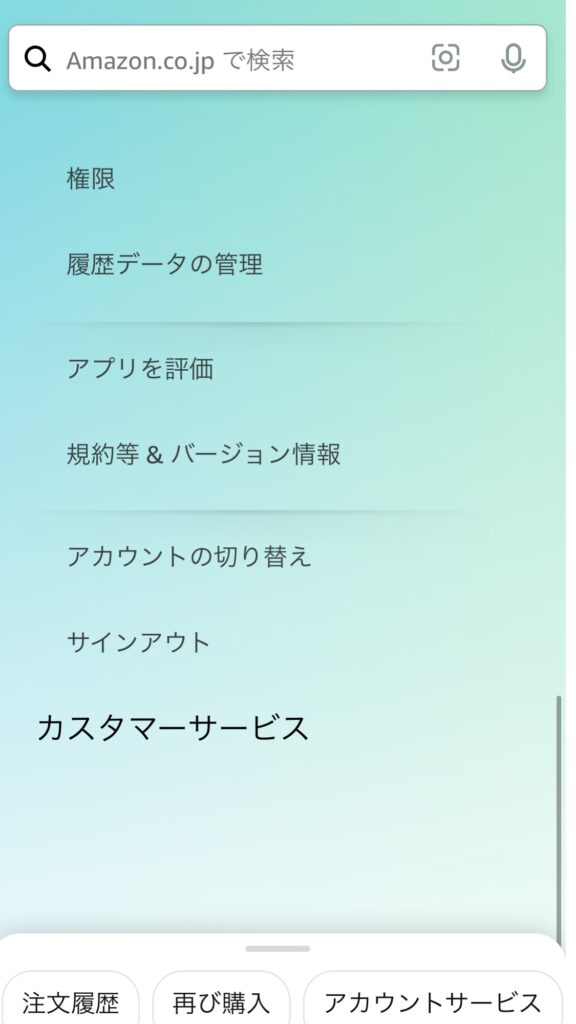
<p class="has-text-align-center">まずは画面右下に出てくる3本線をクリックします。</p>


<p class="has-text-align-center">すると下のような画面になりますので、一番下のカスタマーサービスを選択します。</p>


<div class="wp-block-image"><figure class="aligncenter size-large is-resized"><img decoding="async" src="https://matomeru-navi.com/wp-content/uploads/2021/10/88C07F9A-9D78-4FF1-8715-4E858A66D90A-576x1024.jpeg" alt="" class="wp-image-363" width="283" height="501"/></figure></div>


<div class="wp-block-spacer" style="height: 72px;" aria-hidden="true"> </div>


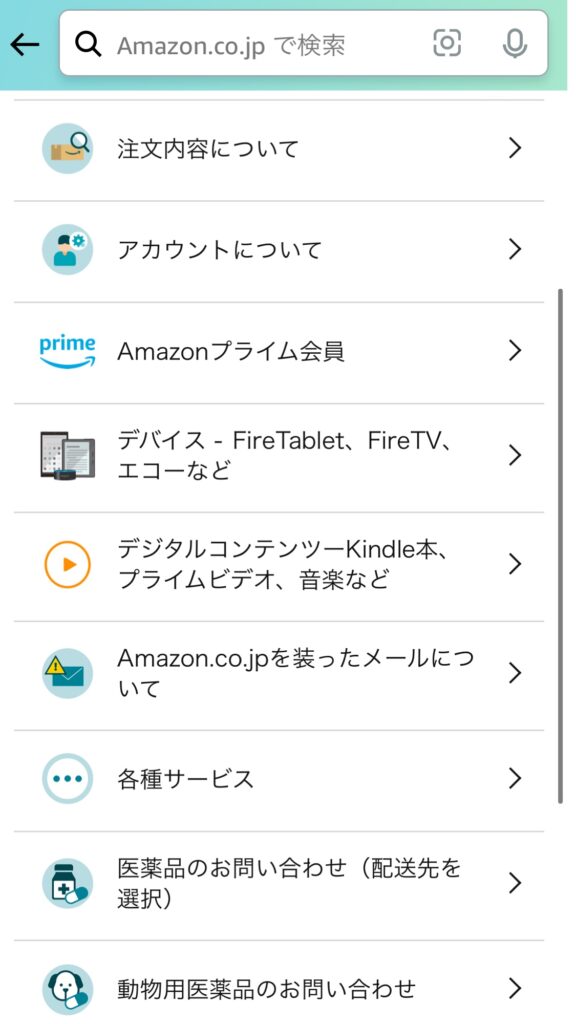
<p class="has-text-align-center"><strong>次にデジタルコンテンツのところを選択します</strong></p>


<div class="wp-block-image"><figure class="aligncenter size-large is-resized"><img decoding="async" src="https://matomeru-navi.com/wp-content/uploads/2021/10/290A7DD7-9410-4B38-B2FD-44F6631D4115-576x1024.jpeg" alt="" class="wp-image-364" width="279" height="495" srcset="https://matomeru-navi.com/wp-content/uploads/2021/10/290A7DD7-9410-4B38-B2FD-44F6631D4115-576x1024.jpeg 576w, https://matomeru-navi.com/wp-content/uploads/2021/10/290A7DD7-9410-4B38-B2FD-44F6631D4115-169x300.jpeg 169w, https://matomeru-navi.com/wp-content/uploads/2021/10/290A7DD7-9410-4B38-B2FD-44F6631D4115-768x1365.jpeg 768w, https://matomeru-navi.com/wp-content/uploads/2021/10/290A7DD7-9410-4B38-B2FD-44F6631D4115-864x1536.jpeg 864w, https://matomeru-navi.com/wp-content/uploads/2021/10/290A7DD7-9410-4B38-B2FD-44F6631D4115.jpeg 380w" sizes="(max-width: 279px) 100vw, 279px" /></figure></div>


<div class="wp-block-spacer" style="height: 57px;" aria-hidden="true"> </div>


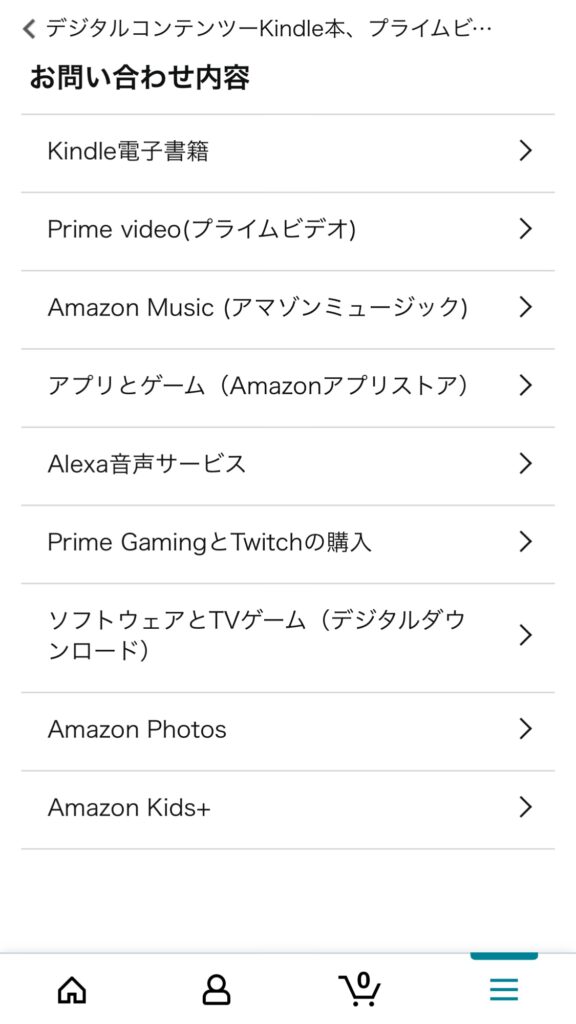
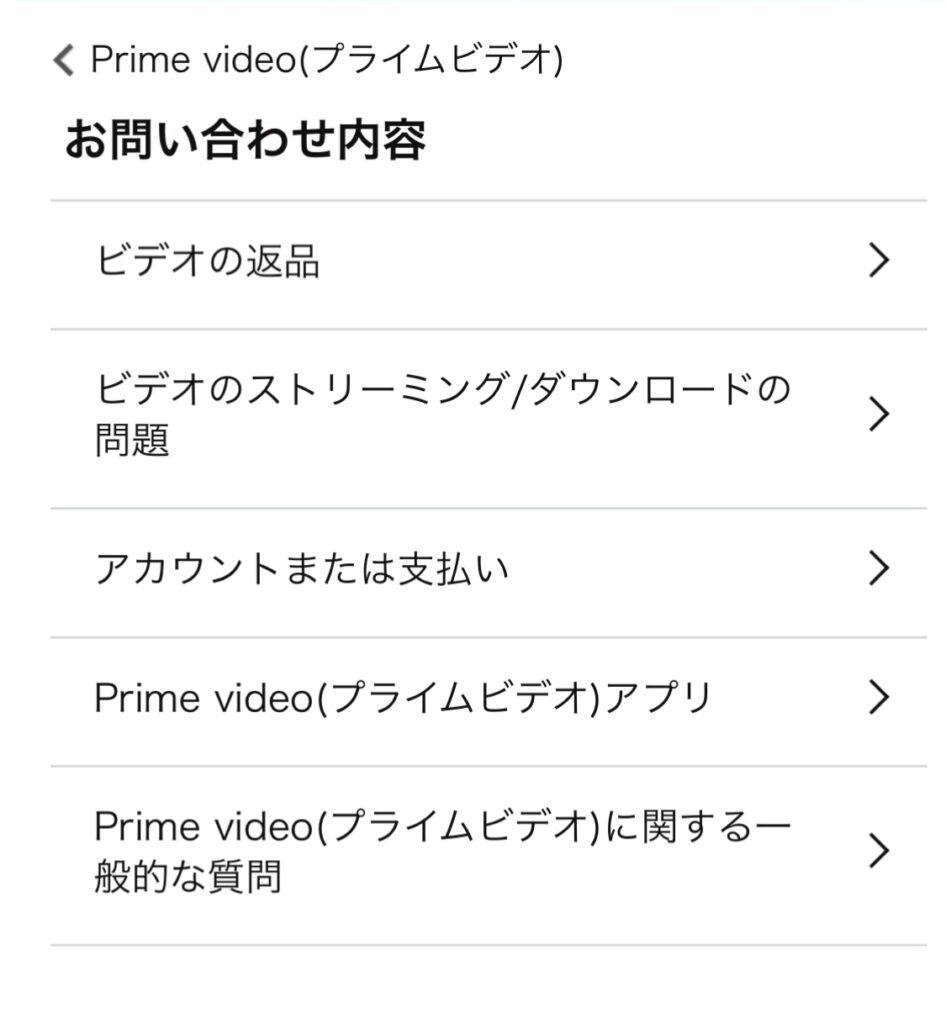
<p class="has-text-align-center"><strong>Prime video(プライムビデオ）を選択</strong></p>


<div class="wp-block-image"><figure class="aligncenter size-large is-resized"><img decoding="async" src="https://matomeru-navi.com/wp-content/uploads/2021/10/04733D68-C07B-48B4-AD3A-B8180CF528C3-576x1024.jpeg" alt="" class="wp-image-371" width="304" height="538"/></figure></div>


<div class="wp-block-spacer" style="height: 59px;" aria-hidden="true"> </div>


<p class="has-text-align-center"><strong>ビデオの返品をクリック</strong></p>


<div class="wp-block-image"><figure class="aligncenter size-large is-resized"><img decoding="async" src="https://matomeru-navi.com/wp-content/uploads/2021/10/B5292215-06F5-4E8C-BA66-CA165062D8F8-946x1024.jpeg" alt="" class="wp-image-374" width="356" height="383"/></figure></div>


<div class="wp-block-spacer" style="height: 67px;" aria-hidden="true"> </div>


<p class="has-text-align-center">画面下の方に<strong>カスタマーサービスへ連絡</strong>をクリック</p>


<div class="wp-block-image"><figure class="aligncenter size-large is-resized"><img decoding="async" src="https://matomeru-navi.com/wp-content/uploads/2021/10/BBA324BD-33E1-4DAD-92FF-0DA9FFC28219-576x1024.jpeg" alt="" class="wp-image-375" width="296" height="523"/></figure></div>


<div class="wp-block-spacer" style="height: 54px;" aria-hidden="true"> </div>


<p class="has-text-align-center">すると下のような画面になるのでお問い合わせの方法を選んでください</p>


<div class="wp-block-image"><figure class="aligncenter size-large is-resized"><img decoding="async" src="https://matomeru-navi.com/wp-content/uploads/2021/10/34FA4F4F-EB7C-41CD-8BA9-B7CAB50DCAF0-1024x674.jpeg" alt="" class="wp-image-378" width="430" height="280"/></figure></div>


<div class="wp-block-spacer" style="height: 71px;" aria-hidden="true"> </div>


<h2 class="has-text-align-center is-style-st-heading-custom-naked has-pale-pink-color has-light-grayish-red-background-color has-text-color has-background wp-block-heading">機能制限の設定方法</h2>


<p>次にチャットで教えてもらった機能制限の設定方法を紹介しますね。</p>


<p class="has-text-align-center has-large-font-size"><strong>&lt;Fire TV &gt;</strong></p>


<p>&nbsp;</p>


<div align="center"><a href="https://www.amazon.co.jp/dp/B079QRQTCR?pf_rd_r=SVSBT9AAPMZ3WE6HE24T&amp;pf_rd_p=85a50a3c-0778-4ea9-b14e-55aa7929ec6f&amp;pd_rd_r=990b9971-5d90-4969-bed7-ebe0acf8177c&amp;pd_rd_w=GYojI&amp;pd_rd_wg=ngoj6&amp;linkCode=li3&amp;tag=tuguminoblog-22&amp;linkId=b40a37c7cf7c3a656d8882e3aaa2520b&amp;language=ja_JP&amp;ref_=as_li_ss_il" target="_blank" rel="noopener"><img decoding="async" src="//ws-fe.amazon-adsystem.com/widgets/q?_encoding=UTF8&amp;ASIN=B079QRQTCR&amp;Format=_SL250_&amp;ID=AsinImage&amp;MarketPlace=JP&amp;ServiceVersion=20070822&amp;WS=1&amp;tag=tuguminoblog-22&amp;language=ja_JP" border="0"></a><img decoding="async" style="border: none !important; margin: 0px !important;" src="https://ir-jp.amazon-adsystem.com/e/ir?t=tuguminoblog-22&amp;language=ja_JP&amp;l=li3&amp;o=9&amp;a=B079QRQTCR" alt="" width="1" height="1" border="0"></div>


<p>まずFire TVのホームページから設定を選択します。</p>


<p>そして設定の<strong>環境設定</strong>を選びます</p>


<p><strong>機能制限</strong>を選択します</p>


<p>PINを入力します（PINは暗証番号だと思ってください）</p>


<p><strong>機能制限をオン</strong>にしてください</p>


<p class="is-style-st-paragraph-kaiwa">簡単にできました</p>


<p>&nbsp;</p>


<p>Prime Videoの機能制限を詳しく知りたい方は<a href="https://amzn.to/2YvUUnD" target="_blank" rel="noreferrer noopener">Amazonで設定を確認</a>してみてください</p>


<div class="wp-block-spacer" style="height: 51px;" aria-hidden="true"> </div>


<h2 class="is-style-st-heading-custom-line wp-block-heading">最後に</h2>


<p>プライムビデオでのキャンセル方法は参考になりましたか？</p>


<p>まずは間違って購入する前に機能制限を設定しておくのが一番安心だと思います。</p>


<p>今回のように問い合わせして返金してもらえるかは保証できませんが、私のようにダメもとで試してみるともしかしたらキャンセルしてもらえるかもしれません。</p>


<p>子育て中にパパママのお役に立てれば幸いです。</p>


<div class="swell-block-capbox cap_box is-style-inner" data-colset="col1"><div class="cap_box_ttl"><span>合わせて読みたい</span></div><div class="cap_box_content">
<p><a href="https://matomeru-navi.com/pampers-point">パンパースのポイントには有効期限がある！23,000ポイント失効した話</a></p>
</div></div>
<p>投稿 <a href="https://matomeru-navi.com/amazon-mistake">Amazon プライムビデオで間違って購入した時の対処法（キャンセルのやり方、できない時は？）</a> は <a href="https://matomeru-navi.com">hapimama</a> に最初に表示されました。</p>
]]></content:encoded>
					
					<wfw:commentRss>https://matomeru-navi.com/amazon-mistake/feed</wfw:commentRss>
			<slash:comments>0</slash:comments>
		
		
		<post-id xmlns="com-wordpress:feed-additions:1">343</post-id>	</item>
	</channel>
</rss>